
Visual order configurator - clients design it themselves, support does what it is actually for
The client runs a company selling custom printed products. Every single order started with an email thread, file exchanges, manual quoting, and several rounds of back and forth before anything went into production. The time spent handling one order was completely out of proportion to its value. My job was to build a configurator that would move most of that work onto the website and let customers place orders on their own, without needing support involved at every step.
- 3steps to orderdesign, quote, contact details
- AIbackground removalautomatic on file upload
- 2development phasesphase 1 live, phase 2 in testing
- 0emails before a quotethe client gets the price instantly
Ordering by email is too long a road
Every order started the same way. A client sent an email asking about pricing, support replied asking for more details, the client sent a file, it turned out the file was in the wrong format or too low resolution, and the back and forth began. Hours of work on both sides before anyone knew what it would cost.
The problem was not poor organisation. It was the lack of any tool that could gather all the information needed for a quote in one place. Clients did not know what to provide, support did not know what to expect. It needed a systemic fix, not a process tweak.
How the configurator works and what it can do
Step 1 - the client designs the product themselves
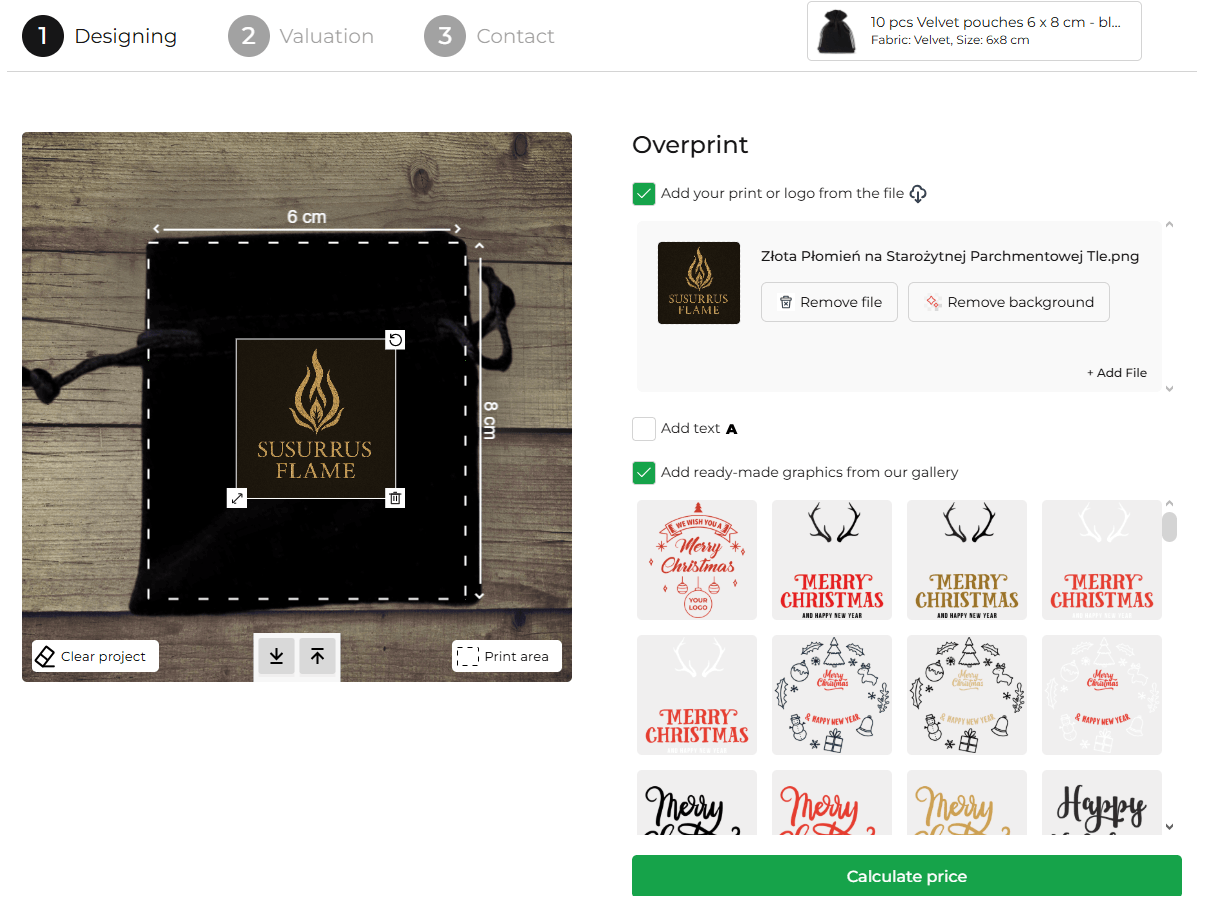
On the product page, the client opens the configurator directly in the browser. They see the product at its actual dimensions with the print area clearly marked. They can upload their own logo or graphic, add text, or pick a ready-made design from the gallery. Everything happens live and changes are visible on the preview instantly.
AI integration - clean graphics without Photoshop
Uploading a file is often where things break down because clients do not always have clean artwork on a transparent background. I built automatic AI-powered background removal directly into the configurator. It runs in the background after the file is uploaded, with no action required from the client. The same logic works the other way too, PDF files are automatically converted to a format the configurator can display.
The price depends on what the client chose
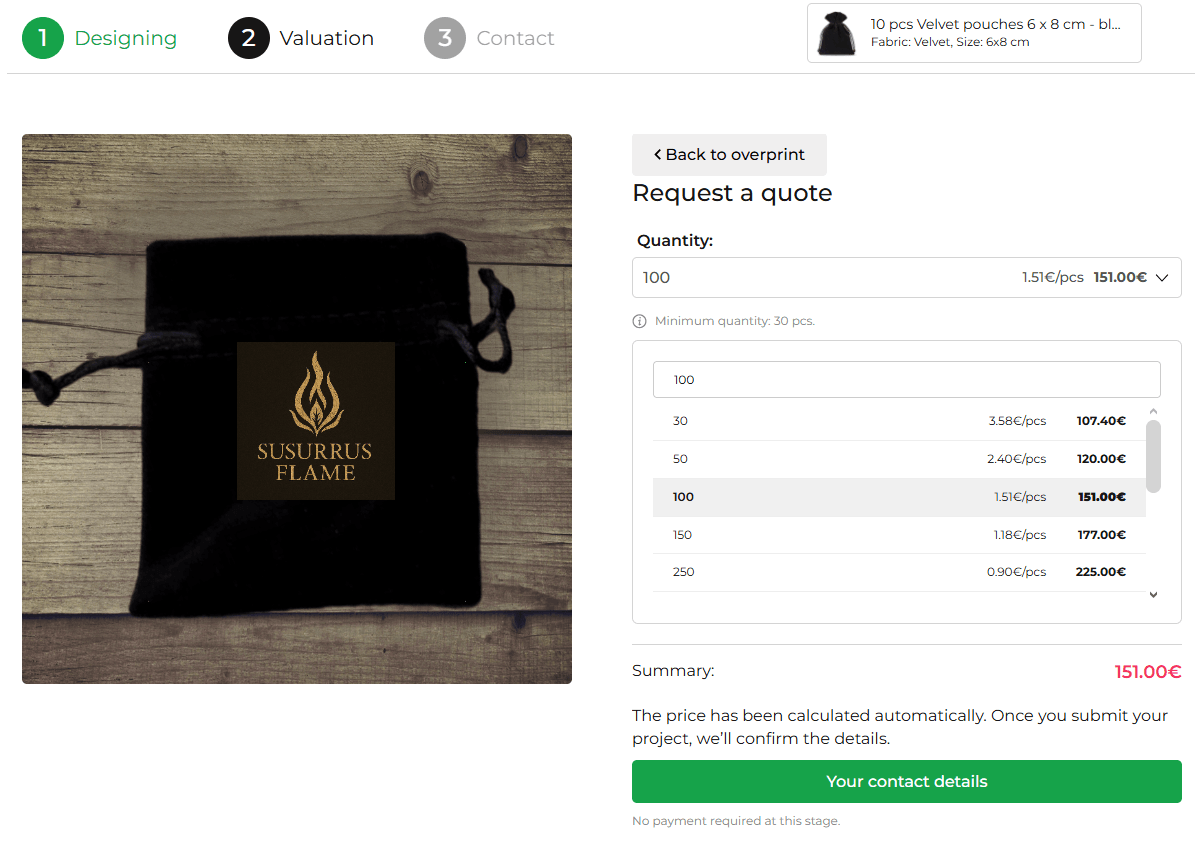
Pricing is not fixed. It depends on the print area size and the quantity ordered. The configurator calculates the price automatically based on those two variables and shows it to the client in step two, alongside a table of quantity tiers. The client sees what they would pay for 30, 50, 100, or 250 units and can adjust the quantity before submitting.
Step 2 - quantity selection and instant quote
After designing the product the client moves to the quote step. They see their design, pick a quantity from the preset list or type their own, and immediately get the unit price and total order value. No waiting for a reply, no emails asking how much it costs.
Step 3 - enquiry form, no registration required
The last step is filling in contact details and submitting the order. No account needed, no unnecessary fields. The client provides what is required and the order lands in the system complete with the graphic design and quote details.
What happens after the order is placed
Phase one solved the problem on the client side. Phase two, currently in testing, handles what comes next - the support side and the fulfilment process itself.
Order lands in the panel immediately
Once an order is submitted through the configurator it appears automatically in the support panel with full details, the design file, and quote breakdown. Support does not need to copy anything across or dig through emails.
Quick payment without the invoice back and forth
The client can pay for their order directly from their client panel. No waiting for a pro forma invoice, no bank transfer with a reference number in the title. The payment is tied to the specific order from the start.
Client communication built into the order
Each order has a built-in communication module. Support can send the client revised designs for review, the client can approve or reject them and add a comment. Everything related to a specific order stays in one place, not scattered across an inbox.
What the configurator changed
Phase one is live and running in production. Clients place orders on their own and support receives complete submissions without having to chase anyone for details.
- Clients get a quote instantly, without contacting support
- Graphics are automatically prepared by AI on upload
- Support receives orders ready to fulfil, not ready to ask about
- Phase 2 brings a full order management panel for both clients and support
Technologies
- WordPress
- WooCommerce
- Custom JS configurator
- AI background removal
- PDF to JPG conversion
- Custom order panel