Delivery Table for Flexible Shipping
Generates a delivery cost table in a WooCommerce store straight from Flexible Shipping zones and rules - shortcode or Gutenberg block, with no hand-maintained table drifting out of sync with the cart.

Who this plugin is for
For WooCommerce stores that price delivery with the Flexible Shipping plugin and want to show customers a readable delivery price list on a shipping information page or in an FAQ - without rewriting it by hand after every rate change. For agencies and freelancers who maintain such stores and prefer one source of truth for delivery prices over two places to keep in sync.
What problem it solves
Flexible Shipping knows what every carrier costs at every order value, but the customer only sees it in the cart. So stores write a delivery price list by hand on a separate page, and that list takes on a life of its own: someone changes the free shipping threshold in the rules, the table stays old and the customer sees a different price than in the cart. This is not just a matter of tidiness: delivery costs have to be disclosed to the customer before the order is placed, and an outdated table can be treated as misleading information about the price. The plugin reads the Flexible Shipping zones and rules and builds a table from them: order value ranges as columns, shipping methods as rows. Change a rule in Flexible Shipping and the table follows on the next page load.
What it does
- A table built from Flexible Shipping zones and rules: order value ranges as columns, shipping methods as rows, nothing configured twice
- The [dtfs_shipping_table] shortcode and the Delivery Table Gutenberg block - the same table from the same code, with the options in the block inspector
- Columns that line up: boundaries are the union of every price change and every free shipping threshold across the methods shown, so two carriers with different thresholds still produce one readable table
- Zone headings in the customer's language: regions as WooCommerce names them (Germany instead of the zone name from wp-admin), several zones for one country under one heading, an anchor for every region
- Prices WooCommerce's own methods too: flat rate, local pickup and free shipping, with Flexible Shipping rules taking over wherever they are enabled
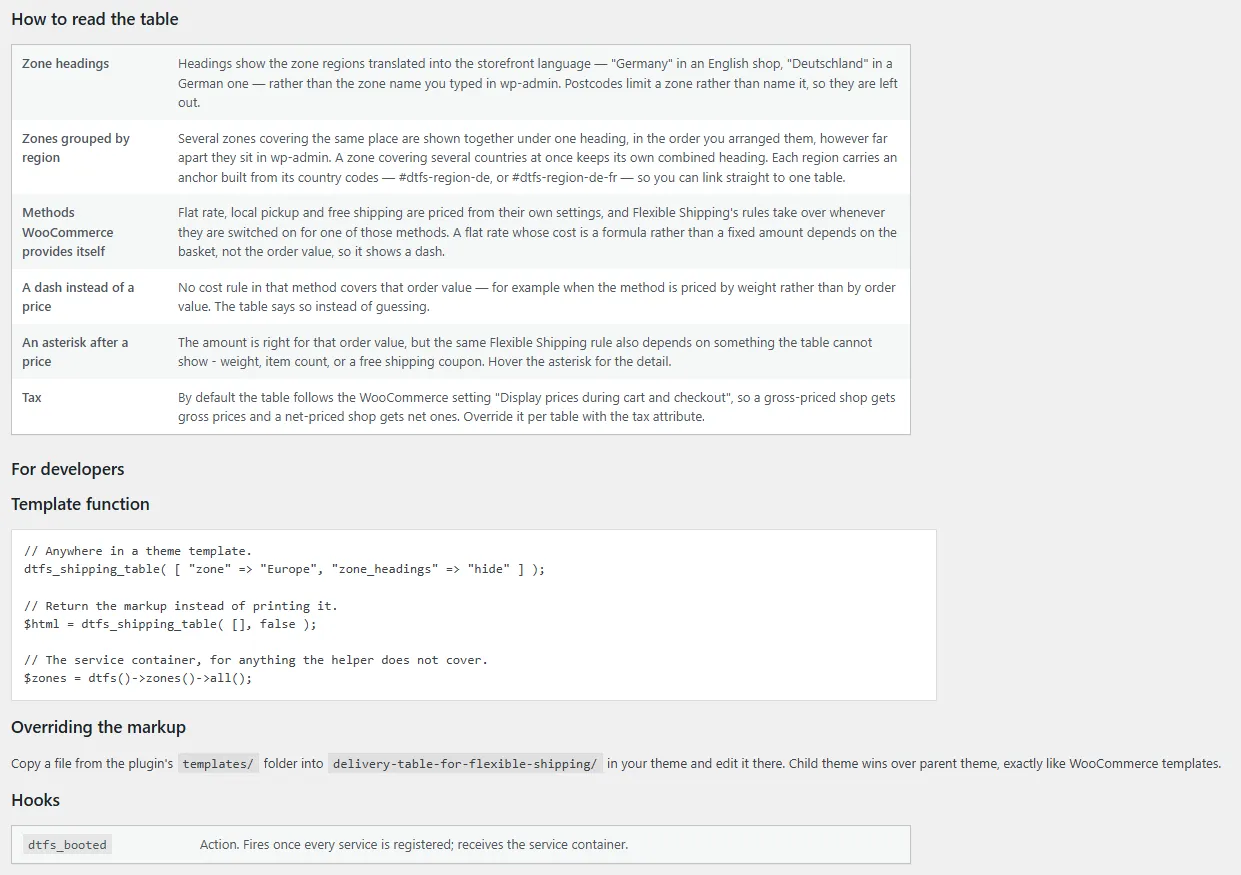
- Honest about what it cannot price: a method priced by weight or item count gets a dash with an explanation, and a price that also depends on weight or a coupon gets an asterisk instead of posing as final
- Tax as in the shop: follows the WooCommerce cart price display setting by default, with tax included or excluded forced per table; correct rounding in zero-decimal currencies too
- An optional split into prepaid and cash-on-delivery tables by a phrase in the method title, table templates overridable in the theme WooCommerce-style, a PHP function and a service container for developers
See how it works
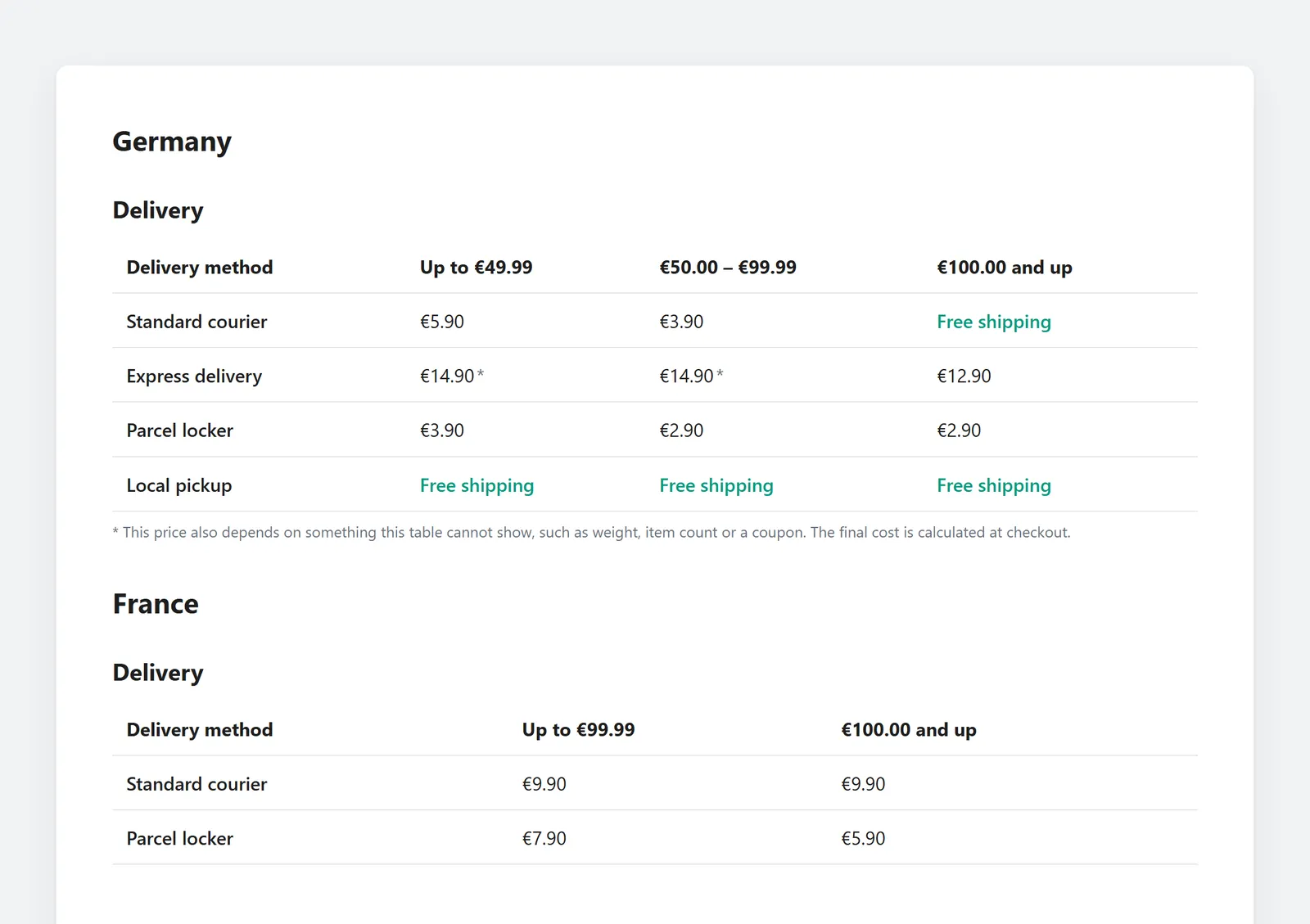
The table in the store: two regions on one page, free shipping where it applies, an asterisk on a price that depends on more than the order value 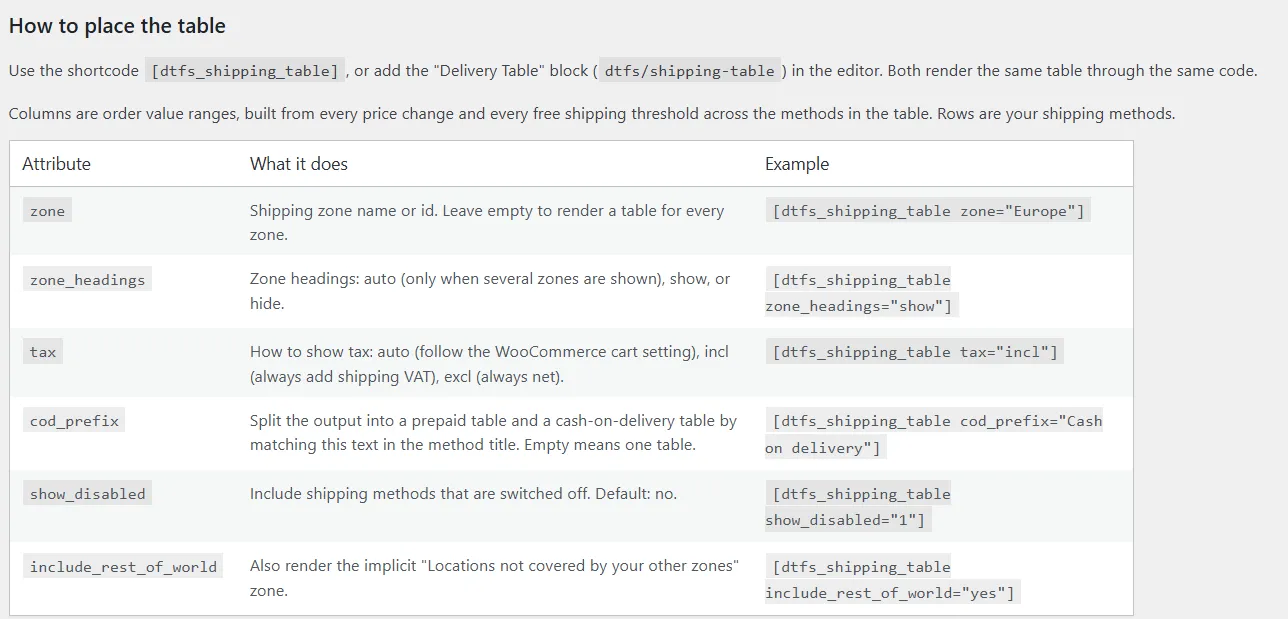
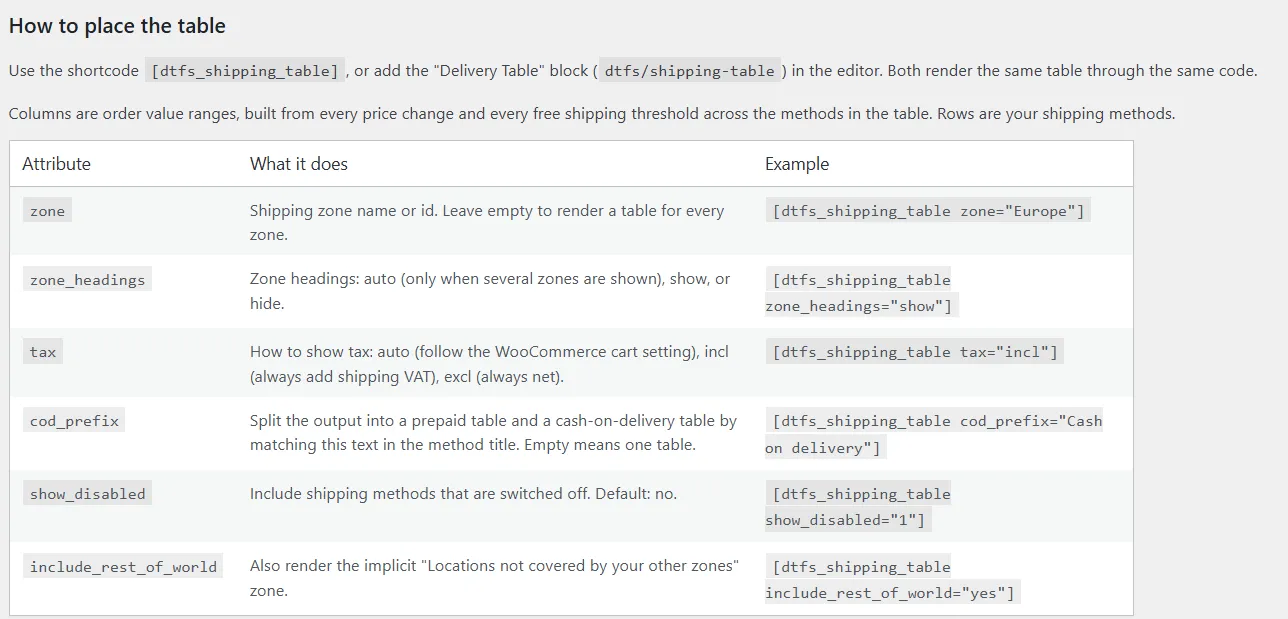
Documentation in the admin: every shortcode attribute with an example 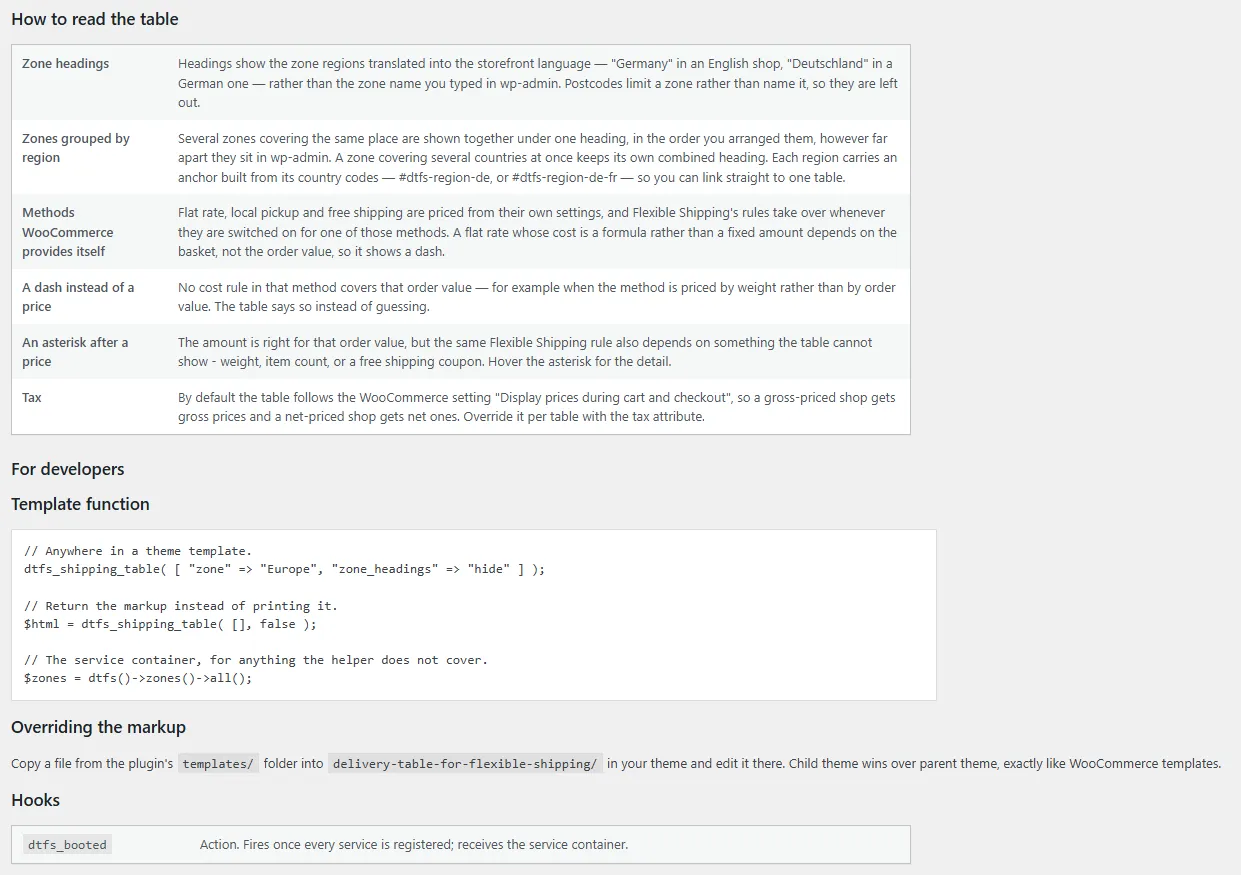
How to read the table and the PHP API for developers: template function, template overrides, hook
Installation and the first table
- Install and activate WooCommerce and Flexible Shipping (WP Desk) if you have not already. The plugin reads their configuration and has nothing to build a table from without them.
- Download the ZIP of the latest release from GitHub and install it in the admin: Plugins, Add New, Upload Plugin.
- On your shipping information page insert the [dtfs_shipping_table] shortcode or add the Delivery Table block in the editor. With no attributes you get one table per zone.
- Narrow it down if needed: a single zone (zone), zone headings (zone_headings), tax included or excluded (tax), a prepaid and cash-on-delivery split (cod_prefix). The full attribute list with examples lives in the admin under WooCommerce, Delivery Table.
- From now on you change rates only in Flexible Shipping. The table on the page updates itself, and if you want a different look, copy a template from the templates directory into your theme.
# Latest release (ZIP):
https://github.com/msiemieniukmorawski/delivery-table-for-flexible-shipping/releases/latest/download/delivery-table-for-flexible-shipping.zip

# Shortcode - every zone, tax as in the cart:
[dtfs_shipping_table]

# One zone, no heading, a separate cash-on-delivery table:
[dtfs_shipping_table zone="Europe" zone_headings="hide" cod_prefix="Cash on delivery"]

# In a theme template:
dtfs_shipping_table( [ 'zone' => 'Europe' ] );
The direct address of the latest release ZIP (stable, it does not change with the version), the shortcode with its most used attributes and the call from a theme template. The plugin deliberately has no settings screen of its own - everything is driven by shortcode attributes or block options.
Requirements and licence
- WordPress
- 6.2+
- PHP
- 8.1+
- WooCommerce
- 7.0+
- Required plugins
- Flexible Shipping (WP Desk)
- Licence
- GPL-2.0
- Changelog
- Releases on GitHub
Why it exists
The plugin was built for a WooCommerce store with around ten shipping zones, each in several variants: different carriers, free shipping thresholds, cash on delivery. A delivery price list on the store's pages is not decoration there but an obligation: before placing an order the customer must be told the delivery costs in a clear and comprehensible manner (Consumer Rights Directive 2011/83/EU, Article 6(1)(e)). A store that fails to do so cannot charge the consumer those costs at all (Article 6(6)), and an outdated table can on top of that be treated as misleading information about the price.
Until then somebody copied that data by hand: from the Flexible Shipping zones and rules into a table in the page editor. With ten zones and dozens of rules every changed rate or threshold meant checking the whole table again, and a single wrong cell meant a price different from the cart and a customer asking about the mismatch or walking away.
The plugin takes that step away from people: it reads what is already in Flexible Shipping and builds the table from it, so there is nothing to copy wrongly. That is also why it has no settings screen of its own (a second place to configure prices is exactly the problem it was meant to solve) and why it shows honest dashes and asterisks where a price cannot be stated for the order value alone. At first the same code also carried a free shipping progress bar and a simplified cart shipping row; they were split out so the plugin does one thing, and the code went to GitHub because every store running Flexible Shipping has the same obligation and the same problem.
Running a store on Flexible Shipping and want a proper delivery page?
I set up Flexible Shipping zones and rules, deploy the delivery table and match it to your theme, and tidy up the whole WooCommerce ordering flow while I am at it. Also for stores that are still choosing a shipping plugin.